

The Ingress Jungle: Surviving the NGINX Deprecation with Backup-as-Code
The King is retiring. For years, ingress-nginx has been the default "front door" for Kubernetes clusters—the safe, boring choice we all relied on. But with recent announcements regarding its archival status and feature freeze, the jungle is waking up.
We are now forced to hunt for alternatives. Whether you are looking at Cilium, Traefik, or the new Gateway API, the path forward isn't just about picking a new tool; it's about testing it safely without breaking production.
How do you validate these new controllers against your actual workloads without hours of manifest rewriting? At IssTech, we solve this with a strategy we call Backup-as-Code.
The Strategy: Backup-as-Code with Veeam Kasten
Testing a migration manually is painful. You usually have to clone your git repos, create a new branch, manually edit the Ingress YAMLs to change the class from nginx to your new choice, apply them to a test cluster, and hope you didn't make a typo.
Backup-as-Code automates this process.
We leverage Veeam Kasten to back up the application in its original state (running on NGINX). Then, we restore that application to a new cluster. During the restore process, we "transform" the data on the fly—either by excluding the old configuration entirely or intercepting the YAML to patch Ingress Classes and strip annotations before the manifests ever hit the Kubernetes API.
This allows you to spin up test cluster environments with your real production data and your new Ingress controller in minutes, eliminating the risk of destroying production.
About Veeam Kasten: Kasten provides native backup, disaster recovery, and application mobility designed specifically for your Kubernetes clusters and data.
Step-by-Step Guide: Migrating FastAPI from NGINX
Let's look at a practical example.
The App: A modern web app consisting of a FastAPI backend and a PostgreSQL database.
The Goal: Move this app from a production cluster (NGINX) to a test cluster (Gateway API or Traefik) using Veeam Kasten Transform Set. Transform Set is a method during the restore process can Kasten Add, Delete or replace a string or value to your existing configuration of the running application running on Kubernetes.
Note: If you want to follow along, feel free to clone or download our demo-app from our GitHub repository.

Phase 1: Backup, Export, and Restore
1. Export the Production Backup First, we need to export our backup from Veeam Kasten. Navigate to the Restore Points menu. Select any restore point, click the three dots (...), and select Export.
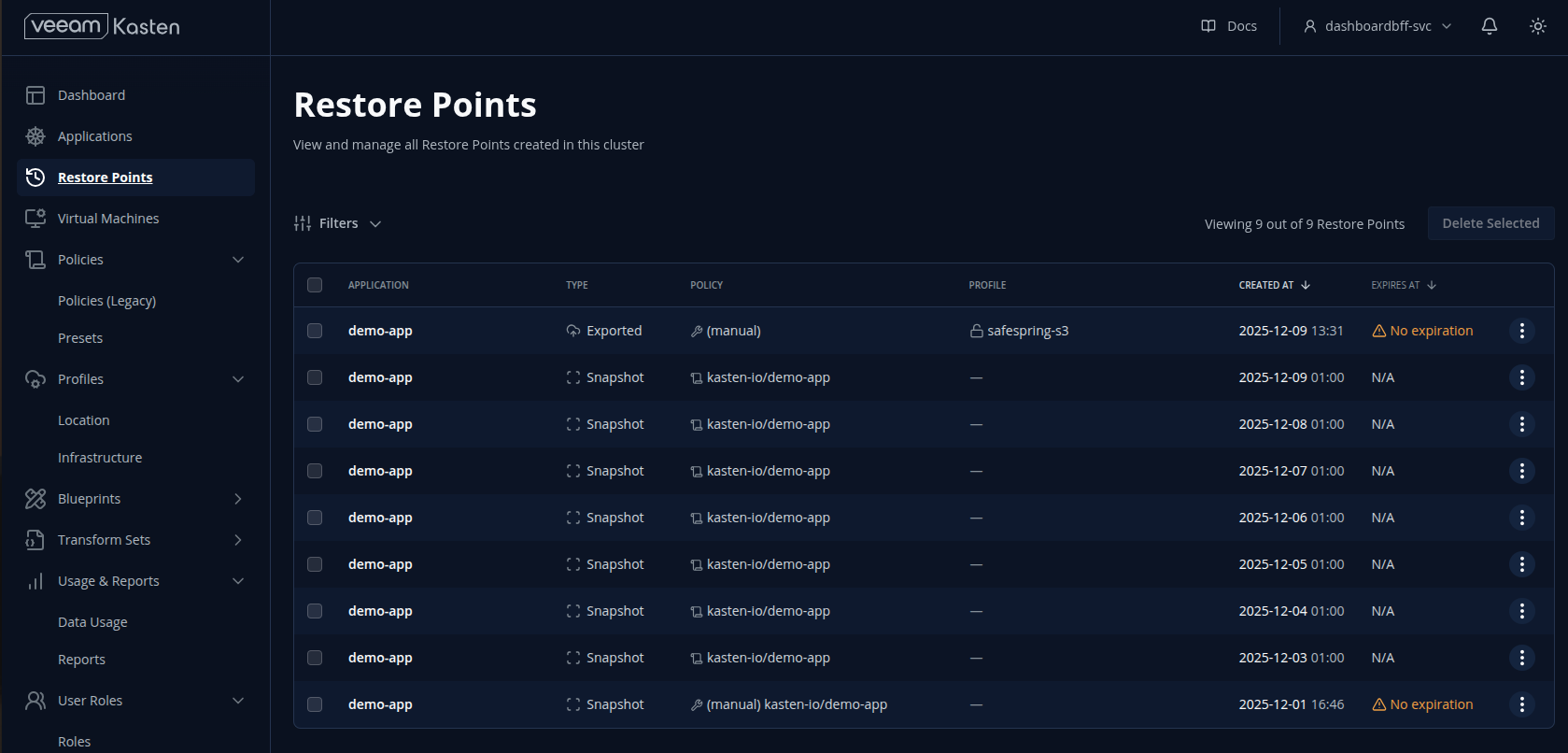
Kasten Restore Points Menu
Once configured, click Export. You will receive a token that is required for the import step.
2. Import to the Test Cluster Open Veeam Kasten in your test environment. Go to Policies -> Create New Policy -> Action: Import. Paste the token from your production cluster and select the profile that points to your S3 bucket.
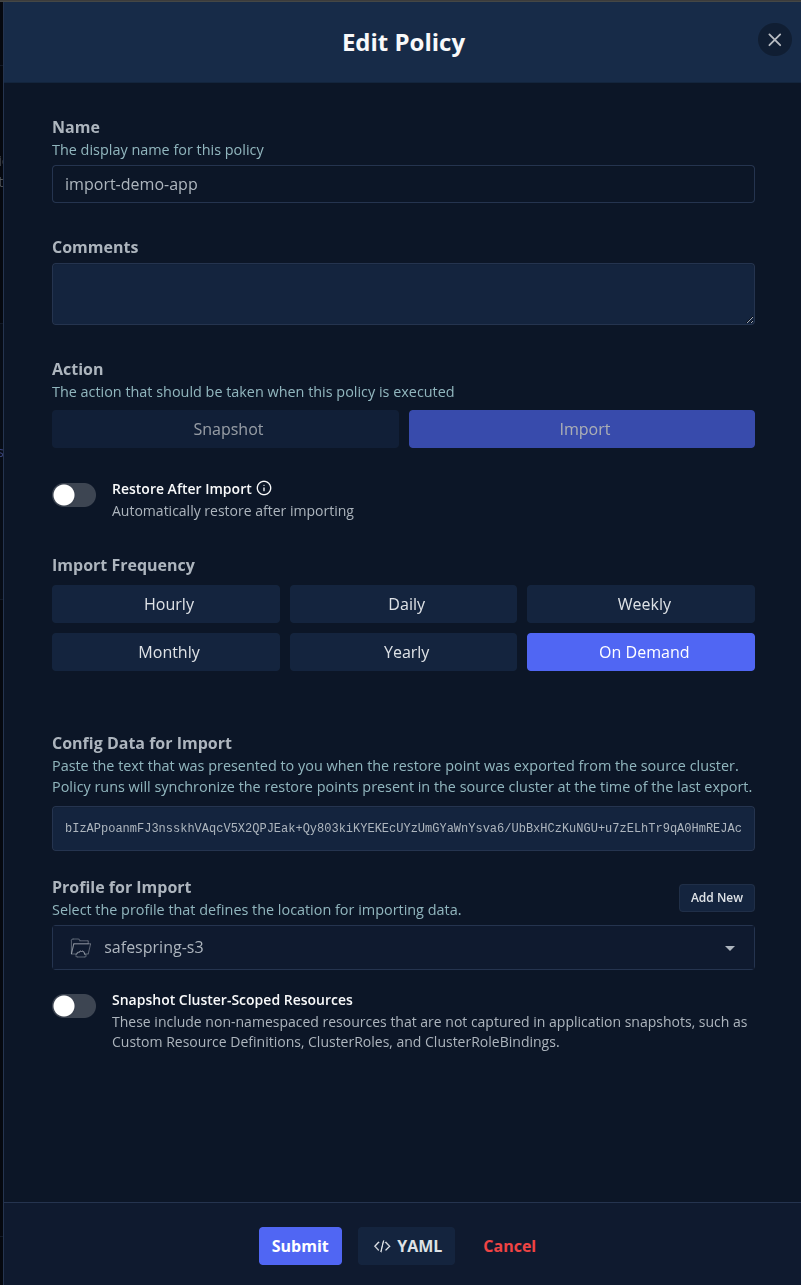
Kasten Import Policy Screen
Run the policy once. You will now see your production restore point available in your test cluster.
Phase 2: The Migration
Because migrating from NGINX to Gateway API (e.g., via Cilium) differs from migrating to a standard Ingress (e.g., Traefik), we have two methods.
Method A: Migrating to Gateway API (The "Exclude" Approach)
If you are moving to the Gateway API, the old Ingress definition is obsolete.
Select Restore: Choose your imported restore point.
Exclude Resources: Scroll down in the restore wizard. You can deselect (exclude) the specific nginx-ingress configuration so it is not restored.
Restore: Click restore. Kasten will pull the image and data without pulling the old networking config.
Apply New Manifests: Once the app is running, simply apply your Cilium and Gateway API YAML files manually.
Here is an example of the Gateway API configuration included in our demo app:
YAML:
apiVersion: cilium.io/v2alpha1
kind: CiliumGatewayClassConfig
metadata:
  name: cilium-nodeport-config
  namespace: demo-app
spec:
  service:
    type: NodePort
---
apiVersion: gateway.networking.k8s.io/v1
kind: GatewayClass
metadata:
  name: cilium-nodeport
spec:
  controllerName: io.cilium/gateway-controller
  parametersRef:
    group: cilium.io
    kind: CiliumGatewayClassConfig
    name: cilium-nodeport-config
    namespace: demo-app
---
apiVersion: gateway.networking.k8s.io/v1
kind: Gateway
metadata:
  name: demo-app-gateway
  namespace: demo-app
spec:
  gatewayClassName: cilium-nodeport
  listeners:
  - name: http
    port: 80
    protocol: HTTP
    allowedRoutes:
      namespaces:
        from: Same
---
apiVersion: gateway.networking.k8s.io/v1
kind: HTTPRoute
metadata:
  name: demo-app-route
  namespace: demo-app
spec:
  parentRefs:
  - name: demo-app-gateway
  rules:
  - matches:
    - path:
        type: PathPrefix
        value: /
    backendRefs:
    - name: demo-app-service
      port: 80
This method makes it incredibly fast to test a new architecture on an app that was previously coupled to NGINX.
Method B: Migrating to Traefik (The "Transform Set" Approach)
If you are moving to another Ingress controller like Traefik, you can modify the existing YAML on the fly.
1. The Challenge Your production NGINX Ingress likely looks like this, containing a specific class and NGINX annotations:
YAML
apiVersion: networking.k8s.io/v1
kind: Ingress
metadata:
  name: demo-app-ingress
  namespace: demo
  annotations:
    nginx.ingress.kubernetes.io/rewrite-target: / # NGINX specific
spec:
  ingressClassName: nginx  # Needs changing
  rules:
  - host: app.isstech.local
    http:
      paths:
      - path: /
        pathType: Prefix
        backend:
          service:
            name: demo-app-service
            port:
              number: 80
2. The Transform Set We create a Transform Set in Kasten to perform two operations:
Change ingressClassName from nginx to traefik.
Remove the NGINX-specific annotation.
apiVersion: config.kio.kasten.io/v1alpha1
kind: TransformSet
metadata:
  name: migrate-nginx-to-traefik
  namespace: kasten-io
spec:
  transforms:
    - subject:
        group: networking.k8s.io
        resource: ingresses
      name: change-ingress-class
      json:
        - op: replace
          path: /spec/ingressClassName
          value: traefik
    - subject:
        group: networking.k8s.io
        resource: ingresses
      name: remove-nginx-annotation
      json:
        - op: remove
          path: /metadata/annotations/nginx.ingress.kubernetes.io~1rewrite-target
Pro Tip: In JSON Patch, special characters in keys (like the / in the annotation) must be escaped as ~1.
3. Execution When performing the restore in the wizard, simply select the migrate-nginx-to-traefik Transform Set.
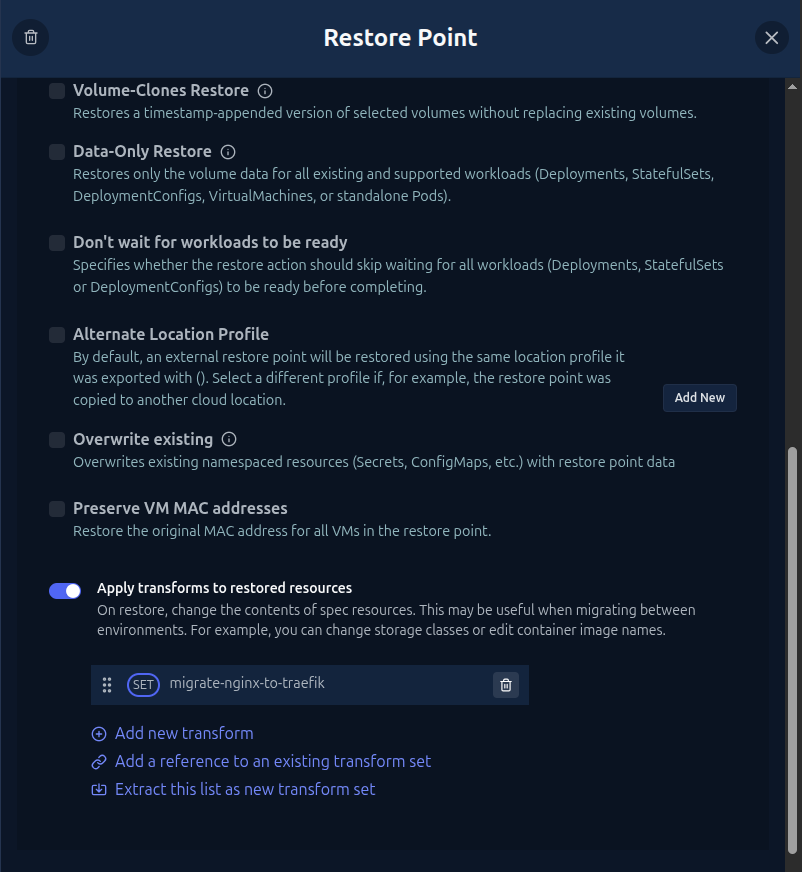
Kasten Restore Wizard with Transform Set Selected
When Kasten restores the application, the Ingress resource lands in the new cluster perfectly configured for Traefik—annotation removed and class updated—without you ever touching a text editor.
Summary
The NGINX deprecation is a forcing function for us to modernize our stacks. Whether you choose Cilium for its eBPF power, Traefik for its middleware flexibility, or adopt the Gateway API, the migration doesn't have to be risky.
By using Backup-as-Code with Veeam Kasten, you turn your backup software into a powerful migration engine. This allows you to test "wild" new configurations with the safety net of your existing data.
Ready to test this yourself? Check out our demo app base code here: IssTech Demo App.